Apple Watch Workout Tracker — GymPsycho
GymPsycho is a hypertrophy workout tracker for iPhone with a full Apple Watch app. Your current set, your rest timer, your heart rate and your next working weight sit on your wrist, while the iPhone keeps the log and puts the running workout on your Lock Screen and in the Dynamic Island. It is free, needs no account, and this page is honest about what the watch does — and what it deliberately leaves to the phone.
What your watch shows during a workout
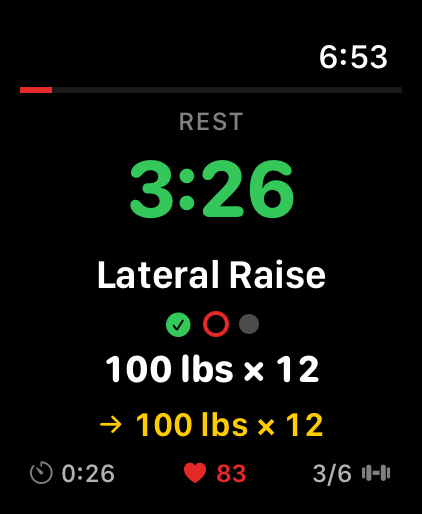
- The set you are on: exercise name, set dots for the sets already done, and the working weight and reps in numerals large enough to read mid-set — with a footer carrying the workout duration, your live heart rate and which exercise you are on.
- Your coach line: your last best set on this exercise — and with Pro, the on-device AI weight suggestion for the next one with a trend arrow.
- The rest timer: counts down to your rest goal when you set one, counts up when you did not, shifts from green to yellow to red, and buzzes your wrist at each phase change.
- Tap to restart rest: tap the timer on the watch and the pause restarts on the watch and on the iPhone at the same time — the one control the wrist owns.
- Live heart rate: read from HealthKit on your wrist during the workout; average and peak land in the iPhone workout summary and in your PDF reports.
- It stays up: an extended runtime session keeps the workout on screen instead of dropping you back to the watch face between sets.
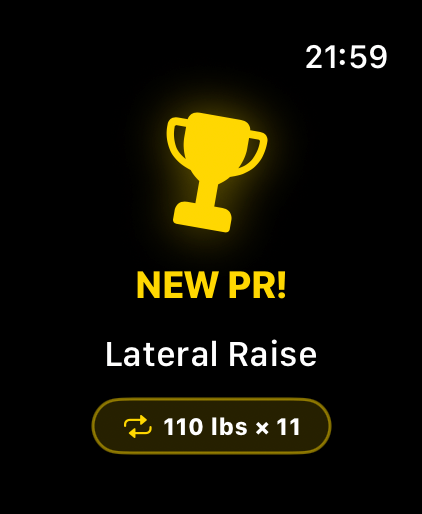
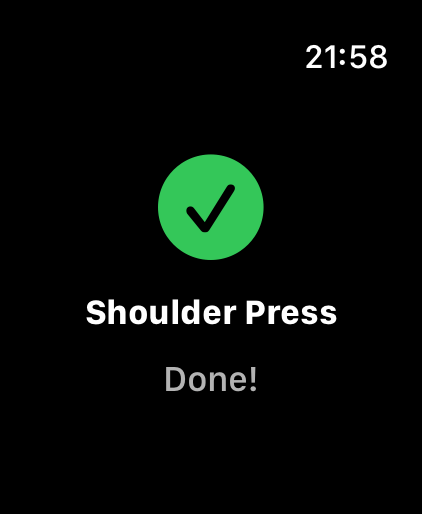
- PRs and the finish: a new personal record fires a celebration on your wrist with the lift and the number, and finishing brings a summary screen with the total duration and your PR count.
- On the iPhone at the same time: a Live Activity on the Lock Screen and in the Dynamic Island — the same workout, one glance away without raising your wrist.
- Your language: the watch interface ships in English, German, Spanish, French, Portuguese and Russian, and follows the iPhone.
What stays on the iPhone
The watch app is a companion, not a replacement. Sets are ticked off in the iPhone app — the watch mirrors that state and controls the rest timer, but it cannot mark a set as done. That is a design decision, not a gap we forgot: both of our watch apps are read-only for set status, because the fastest logging flow we can build is three taps on a phone screen. Your paired iPhone also has to be with you, since it runs the training history and the on-device AI that the watch displays. And the AI suggestion needs GymPsycho Pro; the watch app is free either way.
Set up in four steps
- Install GymPsycho on your iPhone: Get GymPsycho from the App Store. No account and no sign-up — the app works the moment it opens.
- Let the Watch app follow: With automatic app install enabled, the watch app arrives on its own. Otherwise open the Watch app on your iPhone, scroll to Available Apps and tap Install next to GymPsycho.
- Allow heart rate (optional): Open GymPsycho on the watch once and allow heart-rate access when asked. Without it everything else keeps working — you just lose the live BPM and the average and peak in your summary.
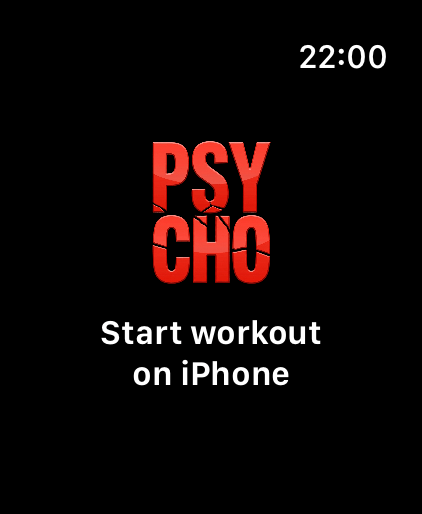
- Start a workout on the iPhone: The watch leaves standby by itself and switches to the live workout screen. Finish or discard on the iPhone and the watch returns to standby.
Apple Watch support across workout trackers
| On the watch | GymPsycho | Strong | Hevy |
|---|---|---|---|
| Apple Watch app | ✓ watchOS 9.6+ | ✓ watchOS 10+ | ✓ Yes |
| Set logging on the wrist | ✗ iPhone logs, watch mirrors | ✓ Record and control from the wrist | ✓ Yes |
| Training with the phone left behind | ✗ Paired iPhone required | ✓ Yes | ✓ Yes |
| Heart rate on the watch | ✓ Live, plus average and peak in the summary | ✓ Heart rate and calories | ✓ Yes |
| Account required | ✓ No account needed | ✗ Account required | ✗ Account required |
In one line: if the point is to leave your iPhone in the locker, Strong and Hevy log on the wrist and we do not. If you train with your phone anyway — for the plan, the volume analysis and the Live Activity — GymPsycho is the only one of the three that puts an on-device AI weight suggestion for your next set on your wrist, and the only one that asks for no account at all.
Feature-by-feature beyond the watch: GymPsycho vs Strong · GymPsycho vs Hevy. Android user? The same app runs on Pixel Watch and Galaxy Watch. Competitor details above were checked on 17 August 2026 against Strong's and Hevy's own help centres and store listings — verify the current listings before you subscribe to anything.
Which watches this runs on
- watchOS 9.6 and newer: Apple Watch Series 4 and later, every SE generation and every Ultra. Series 3 and older stay on the iPhone app.
- Sized per display: the layouts are tuned for the 40/41/42 mm class, the 44/45/46 mm class and the Ultra, so the numbers stay large without anything falling off the edge.
- Same numbers, both wrists: Android users get the equivalent Wear OS app. Both watch apps are built from the same workout state, so a household on mixed platforms sees the same thing.
Frequently Asked Questions
Which Apple Watch models does GymPsycho support?
The GymPsycho watch app needs watchOS 9.6 or newer, which covers Apple Watch Series 4 and later, all SE generations, and every Apple Watch Ultra. Series 3 and older cannot run it.
Can I log sets from the Apple Watch?
No, and that is a deliberate design decision rather than a missing feature: both watch apps are read-only for set status. You tick sets off in the iPhone app; the watch is the live readout for the set you are on, and the rest timer is the one control it owns — tap it and the pause restarts on both devices. If logging a whole session from the wrist is your priority, Strong's Apple Watch app does that and ours does not.
Do I need my iPhone with me during the workout?
Yes. The watch app is a companion: your iPhone runs the workout, the training history and the on-device AI, and the watch mirrors it. GymPsycho has no cloud account, so there is no server the watch could fall back to — which is the same reason your data never leaves your devices.
What does GymPsycho put on the Lock Screen and Dynamic Island?
A Live Activity on the iPhone: the running workout with the current exercise, your set progress and the rest countdown, visible on the Lock Screen and in the Dynamic Island on iPhone 14 Pro and newer. It updates with every set you log and disappears when you finish the workout.
Does the Apple Watch app track heart rate?
Yes. The watch reads your heart rate from HealthKit while a workout runs and shows the live value in the footer. When you finish, the average and peak travel back to the iPhone and appear in your workout summary and PDF reports. Heart rate is optional — deny the permission and the rest keeps working.
Is the Apple Watch app free?
Yes. The watch app is part of the free GymPsycho app — no account, no ads, no separate purchase. One thing on the wrist is Pro-only: the on-device AI weight suggestion for your next set. GymPsycho Pro is $6.99/month or $49.99/year with a 14-day free trial; without Pro the same line shows your last best set.
Curious what the AI on the coach line actually computes? That is Training Intelligence — weight prediction, plateau detection and per-muscle MEV/MAV/MRV volume, all on your device.
Try GymPsycho Free
Free to use, forever. No account needed — install it on your iPhone, the watch app follows.
Download Free